Layers
Material Library and Test
Keep the settings that work for each material, add a starter library for your machine, then confirm them with a material test grid.
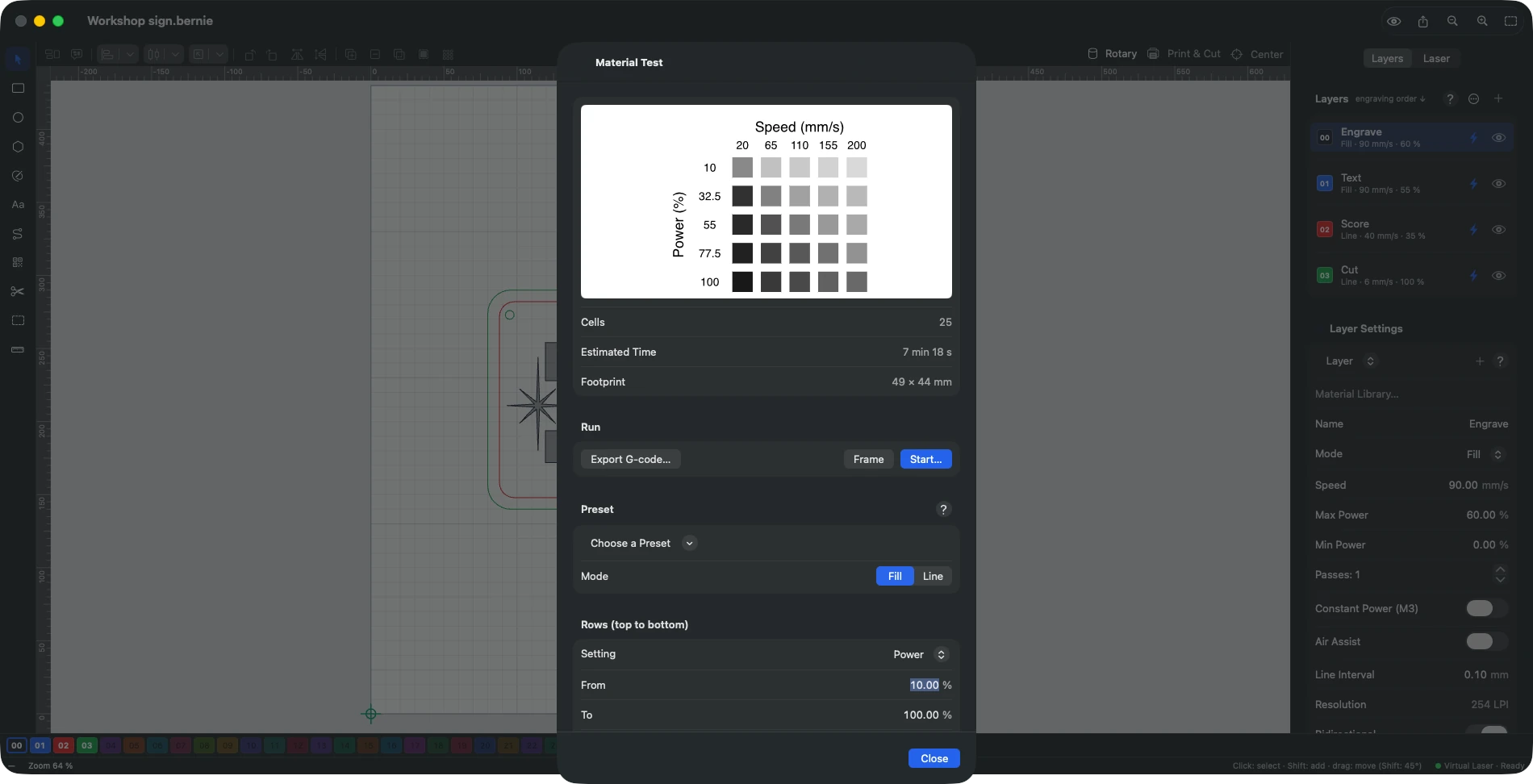
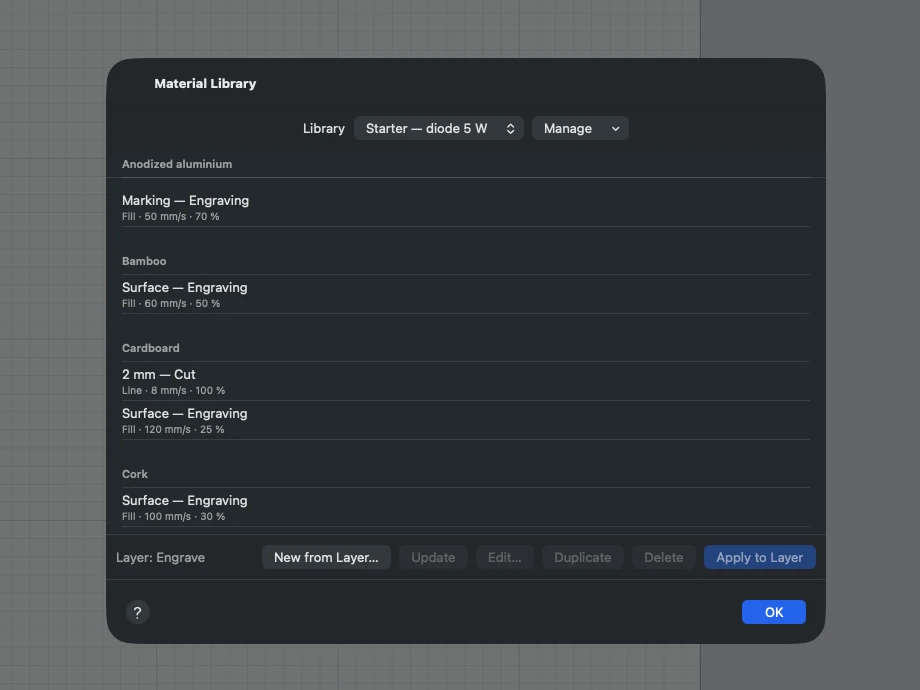
- Material library: saves a layer’s settings by material and thickness and reapplies them in one click; imports LightBurn libraries (
.clb). Manage › Add a Starter Library: general settings — diode 5, 10 or 20 W, CO2 40 to 60 W: cuts and engravings for common materials (plywood, MDF, cardboard, leather, slate, anodized aluminium, acrylic with CO2…), cautious settings; by machine — Creality Falcon2 22 W, Elegoo Phecda, Snapmaker Ray (20 and 40 W modules), xTool D1 10 W, D1 Pro and 20 W, 80 W MOPA and Gweike G2 Max 50 W fibers (frequency and pulse width included); settings collections — settings gathered by diode laser users, the power not always being stated. The material names, titles and descriptions of these libraries are translated into the interface language; the menu shows how many settings each holds (over 700 for the xTool D1). Choosing the Creality Falcon2 22 W, the Snapmaker Ray or an xTool D1 Pro under Commercial machine adds its library and links it to the profile. All of them should be checked with a material test on your machine. In Bernie Studio, the starter libraries are in the window’s list, by section, and a Search for a material… field filters long lists; the device window names the chosen machine’s library. Never cut PVC or vinyl: they release chlorine, which is toxic and corrodes the machine. Duplicate copies an entry (a variant for another thickness or finish); Manage › Link to Device opens this library by itself when the device becomes active. Manage › Store in a Shared Folder…: iCloud Drive, network drive or synced folder; other computers that pick the same folder see the same libraries (read again each time the window opens, or with Reload Shared Folder). An empty folder receives a copy of your libraries; Back to This Device’s Folder restores local storage. - Material test (Laser menu): grid of cells where power, speed, interval or passes vary, with labels (perforated text for a powerful laser: digits as a dashed outline, which do not burn), engraved in order of increasing energy. Keep a Cell: pick the successful cell and the material; its settings go into the library (with the test date) and can then be applied to a layer. Scanning offset pattern preset: five 50 × 10 mm strips, filled back and forth (0.5 mm interval), from a fifth of the device’s maximum speed to the full speed (see Scanning offset, below). Focus: Z Height preset (device with a Z axis): one line per head height, from 3 mm below focus to 3 mm above; the thinnest line gives the right Z offset. Firing Threshold: Low Powers preset: twenty lines from 1 to 20 %; the first visible line gives the power below which the laser does not mark (useful for the layers’ minimum power and the low end of image gradients). Save as Preset… keeps your own test settings.
- Calibration patterns (Laser › Calibration Patterns), added at the centre of the view with the active layer’s settings:
- Kerf test: a plate with 11 slots and a tab of the chosen width (the thickness of the material to fit). Each slot is narrowed by a kerf from 0 to 0.30 mm, engraved below it. After cutting, the slot where the tab is a snug fit gives the value to enter in the layer’s “Kerf width”.
- Backlash test: circles and squares of 5, 10 and 20 mm. An oval circle, or an outline whose start and end do not meet, reveals belt backlash or too high a speed.
- Dot width correction test: five 50 % grey squares, each on its own Image layer (ordered dithering, one-way scanning, speed, power and interval of the active layer), with a correction from 0 to 80 % of the interval, written below. The right square forms an even checkerboard: its value goes into the Image layer’s “Dot width correction”.
This manual is also built into Bernie: press F1, or open the Help menu, to read the topic for what you are doing. A mistake, a missing answer? Tell us
Try it in Bernie, for free.
Free laser engraving and cutting software for diode, CO2, fiber and galvo lasers. Windows, Mac, Linux, iPad, iPhone and in the browser.