In short: almost every diode laser sold today runs GRBL or one of its descendants (grblHAL, FluidNC), so you have a real choice of GRBL laser software. For a free app on Windows, Mac, Linux and in the browser, try Bernie. LightBurn is the mature paid reference, from $99. LaserGRBL is free and simple, but Windows only. Rayforge and MeerK40t are free and open source.
Below: the six options side by side, what a GRBL controller actually needs from its software, the two settings behind most beginner problems, and a complete setup of a GRBL laser, from the USB cable to the first job.
GRBL laser software compared
All six drive a GRBL laser over USB. They differ in price, platforms and how much design work they do for you. Prices and licences were checked on each publisher’s site at the time of writing.
| Software | Price | Platforms | Best for |
|---|---|---|---|
| Bernie | Free (donations) | Windows, Mac, Linux, iPad, browser (Bernie Studio) | Design and laser control in one free app, with settings checks on connection |
| LightBurn | Core $99 one-time (G-code lasers); Pro $199 adds DSP and galvo | Windows, Mac (Linux stopped after version 1.7) | A mature paid tool with a large community |
| LaserGRBL | Free, open source (GPLv3) | Windows only | Quick image engraving on a Windows PC |
| Rayforge | Free, open source (MIT) | Windows, Mac, Linux | An open-source designer that also drives Marlin, Smoothieware and Ruida |
| MeerK40t | Free, open source (MIT) | Windows, Mac, Linux, Raspberry Pi | Mixed workshops: K40, GRBL, Ruida and galvo |
| Universal G-code Sender | Free, open source (GPLv3) | Windows, Mac, Linux, Raspberry Pi | Sending G-code you prepared elsewhere (CNC first) |
What GRBL laser software has to do
GRBL is firmware that turns G-code into motor steps and laser power. It has no screen and no idea what a photo or a font is. Your software does all of that: it turns your design into G-code lines, streams them over USB (usually at 115,200 baud) and watches the status reports so it can pause, resume or stop.
Good GRBL laser software also reads the controller’s settings, the list you get when you type $$ in a console. Two of them explain most of the strange results people post online:
- $32, laser mode. With
$32=1, GRBL keeps moving while the power changes and turns the laser off on rapid moves. With$32=0, it treats the laser like a spindle: it stops at every power change, which leaves dark dots at corners and burnt marks between shapes. - $30, maximum power value. GRBL scales power from 0 to the value of
$30(often 1000, sometimes 255). If your software thinks the maximum is 1000 and the controller is set to 255, everything above about 25 % comes out at full power. The other way round, the laser never gets past a quarter of its power.
A third point matters for image engraving: in laser mode, M4 (dynamic power) scales the power with the actual speed, so the head slowing down at each end of a line does not burn darker edges. Most laser software uses it for fills and images.
grblHAL and FluidNC are GRBL too
grblHAL (on faster 32-bit boards) and FluidNC (on ESP32 boards, often with Wi-Fi) speak the same language as GRBL. Any GRBL laser software can drive them over USB; software that supports Telnet can also reach them over the network.
The six options, one by one
Bernie: free, design and control in one app
Bernie is free laser engraving and cutting software, funded by optional donations that unlock nothing. It drives GRBL, grblHAL, FluidNC, Marlin, Smoothieware and Ruida, plus JCZ galvo boards and stock K40 boards; the compatibility list names 125 machines by brand and model.
Its GRBL side goes further than sending files. On every connection it reads $$, compares laser mode, maximum power, travel, speeds and accelerations with your machine profile, and offers a one-click fix. It also opens LightBurn projects, ships more than 1,800 material settings, and has a virtual GRBL laser to try everything before you plug anything in.
LightBurn: the paid reference
LightBurn is the tool most tutorials are made with, and its design and layout features are excellent. Core costs $99 one-time and covers G-code lasers (GRBL, Marlin, Smoothieware), with a year of updates; Pro, at $199, adds DSP and galvo controllers. After the first year, updates cost $40 a year. Current versions run on Windows and macOS; the Linux version stopped at 1.7. If you already own it, our comparison of Bernie and LightBurn shows where the two differ.
LaserGRBL: free and simple, on Windows
LaserGRBL is free and open source (GPLv3) and made for GRBL v0.9 and v1.1 lasers. It is very good at what it was built for: load a photo, pick a dithering, engrave. Vector import is limited to SVG and marked experimental, and there is no design tool beyond that. It runs on Windows only.
Rayforge: open source and cross-platform
Rayforge is a free, MIT-licensed app for Windows, Mac and Linux. It drives GRBL over USB or the network, Marlin, Smoothieware and Ruida, and can send to OctoPrint. It is moving fast, which is good news for features and means you should expect changes between versions.
MeerK40t: for mixed workshops
MeerK40t started as K40 software and now also drives GRBL, Ruida and JCZ galvo boards, on Windows, Mac, Linux and Raspberry Pi. It is free (MIT). Its authors describe it as being in a low-maintenance phase, so answers to issues can be slow.
Universal G-code Sender: a sender, not a laser studio
UGS is a free (GPLv3) G-code platform for GRBL, FluidNC, grblHAL and other CNC controllers, on Windows, Mac, Linux and Raspberry Pi. It has a designer with laser engraver support, but it is built around CNC milling. It suits you if you already prepare G-code elsewhere and only need to send it.
How to choose your GRBL laser software
Five questions before you install
- Which computer? On a Mac or Linux, LaserGRBL is out; see our guide to laser engraving software for Mac.
- Design or just send? If you draw in Inkscape or Illustrator and only send, a simple sender is enough. If you want text, shapes, tracing and photos in one place, pick a full app.
- One laser or several? A diode today and a CO2 or galvo tomorrow favours software that covers several controller families.
- USB or Wi-Fi? FluidNC and grblHAL boards often offer Wi-Fi or Ethernet: check that the software connects over the network.
- Budget? Free options exist on every platform; try two on the same small job before you pay for anything.
How to set up a GRBL laser in Bernie
Here is the full setup on Mac or on the Windows and Linux desktop app, from the USB cable to a first job. The project is a 140 × 50 mm plywood sign on an Ortur Laser Master 3, a GRBL diode laser, but the steps are the same for any GRBL, grblHAL or FluidNC machine.
- Plug the laser in over USB and switch it on. Recent versions of macOS recognise the usual USB chips; otherwise install the CH340 (WCH) or CP2102 (Silicon Labs) driver. On Linux, add your account to the
dialoutgroup, then log out and back in. - Laser › Find My Laser… Bernie queries the USB ports at 115,200, 250,000 and 460,800 baud, recognises the GRBL controller without moving the head, and creates the device profile from the connected machine. You can also pick your model in Settings › Devices › New, under Commercial machine, or choose From the Connected Laser.
- Connect. In the Laser panel, choose USB, the port, then Connect. For a Wi-Fi or Ethernet board (grblHAL, FluidNC), choose Network and Search the Network: lasers that announce themselves show up, and a click fills in the address.
- Check the settings Bernie read. On connection, Bernie compares
$30,$32, travel ($130,$131), speeds and accelerations with the profile. If something differs, the Laser panel says so: Show… details it, Align the Profile with the Machine copies the values into the profile, and Enable Laser Mode on the Machine ($32=1) fixes laser mode. - Review the controller if needed. Controller Settings ($$)…, in the Laser panel, reads and edits the whole list, with a backup before each write. The manufacturer settings (steps per mm, motor direction, homing) stay collapsed behind a warning. If the work area in Bernie differs from the machine, a banner offers Adapt Device.
- Draw or import, then set the layers. Type the text, draw the outline, or use File › Import…. Put the engraving on a Fill layer and the outline on a Line layer, and start from the material library or a Material Test… on an offcut.
- Check the preview. The eye button shows the real paths, the estimated time and the pre-flight check, which flags, for example, a layer speed beyond what your laser can do.
- Frame, then start. Framing traces the job outline with a very weak dot, so you can place the workpiece. Then Start, wear glasses suited to your laser, and stay with the machine until the end.
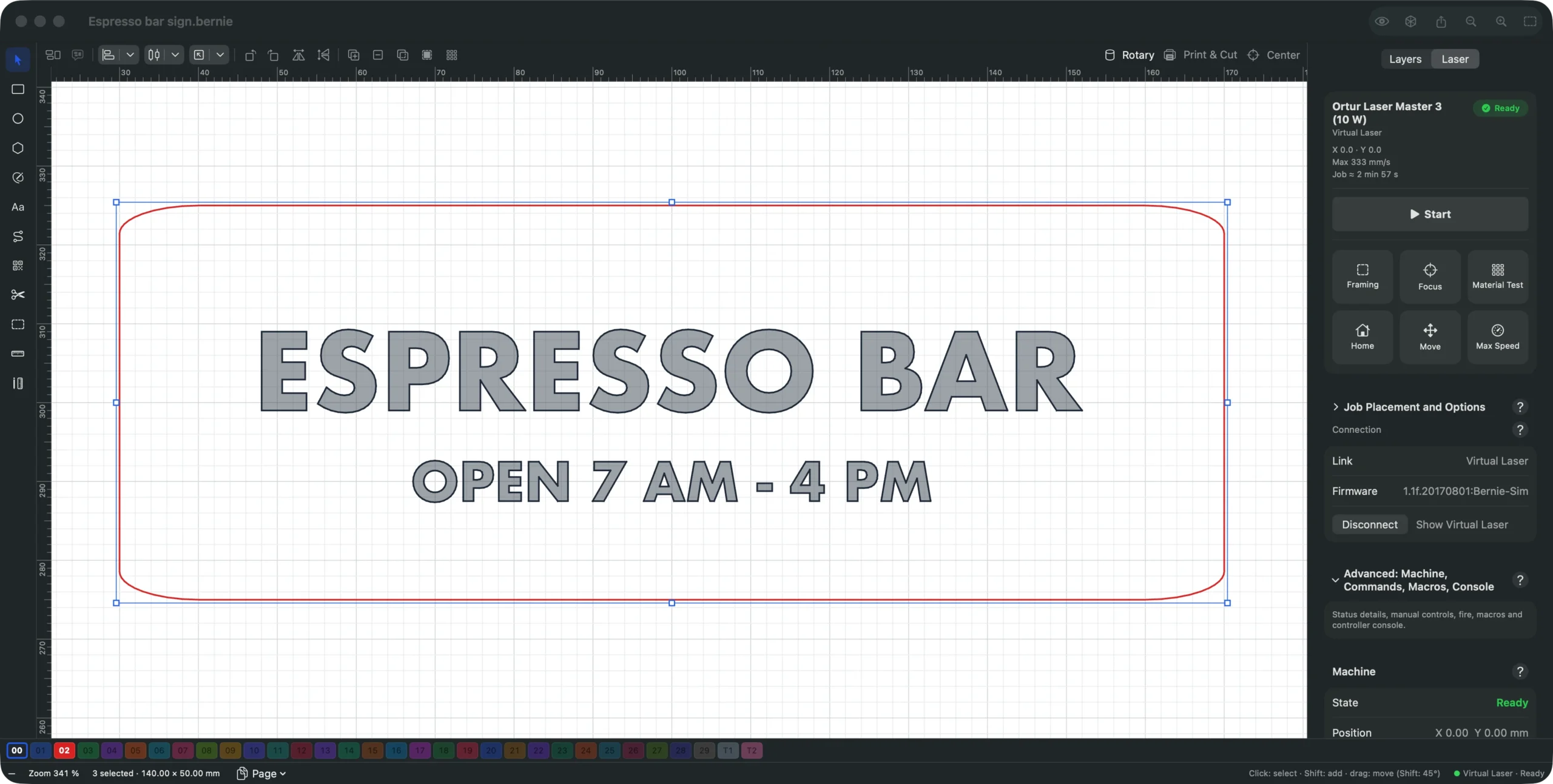
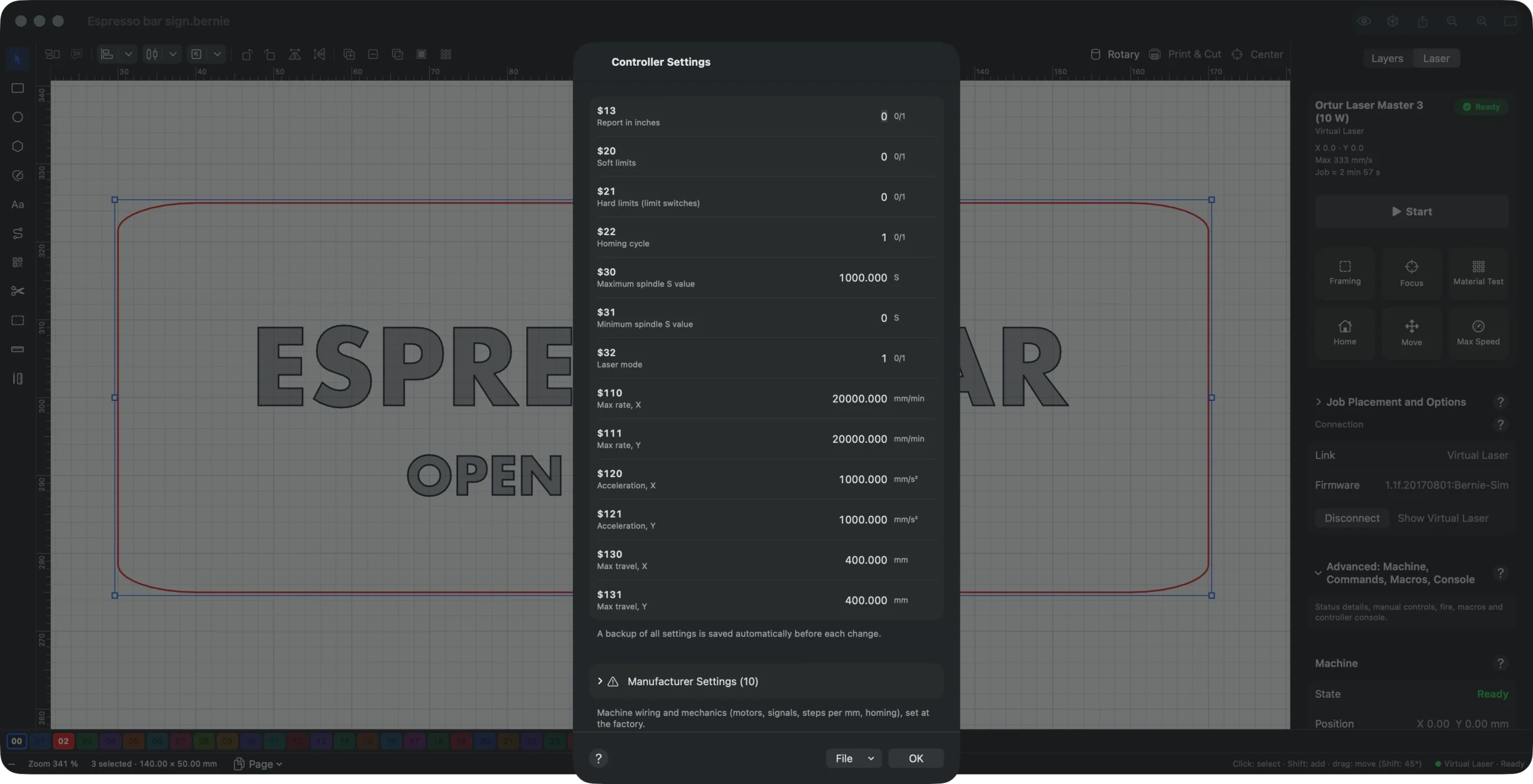
No laser at hand yet? Leave the link on Virtual: a simulated GRBL laser accelerates, brakes and engraves like a real one, so you can rehearse every step. The Connection and Controller pages of the manual go into each option.
Set up your GRBL laser today
Follow these steps with Bernie, free, with no account and no subscription, on Mac, Windows or Linux, or in Chrome and Edge with Bernie Studio, which reaches a USB laser through WebSerial.
Common GRBL problems and the setting behind them
When a GRBL laser misbehaves, the cause is often a controller setting rather than the design. This table starts from what you see.
| What you see | Likely cause | What to check |
|---|---|---|
| Dark dots at corners, burnt lines between shapes | Laser mode off | $32=1 |
| Everything burns at full power above a low setting | Software and controller disagree on the maximum | $30 and the S max of your profile |
| The laser never gets past a fraction of its power | Same mismatch, the other way round | $30 and the S max of your profile |
| Job refused, “ALARM” after start | Target beyond the travel, or homing failed | Work area, $130 and $131, home with $H |
| The design is shifted on the bed | A work offset (G54, G92) left active | Reset the offset or the user origin |
| Nothing happens over USB | Port in use by another program, wrong cable or driver | Close the other program; try another cable |
Bernie catches several of these before the job: it reports laser mode, maximum power and a leftover work offset on connection, and the pre-flight check looks at the job itself. For power and speed values per material, see our laser engraving settings chart.
Safety first, whatever the software
Software cannot make a laser safe on its own. Wear glasses rated for your laser’s wavelength, extract the fumes, keep a fire extinguisher nearby, and never leave a job running unattended. Never cut PVC or vinyl: they release chlorine compounds that harm you and corrode the machine.
Conclusion
The best GRBL laser software is the one that fits your computer and the way you work. LightBurn remains the paid reference, LaserGRBL a simple free choice on Windows, Rayforge and MeerK40t solid open-source options. If you want design, settings checks and laser control in one free app on every platform, download Bernie and try it on your next job, or see how it connects to your laser first.
Frequently asked questions
What is the best free GRBL laser software?
It depends on your computer. On Windows, LaserGRBL is a simple free choice for images. For a free app that also draws, traces and checks your controller settings on Windows, Mac, Linux and in the browser, try Bernie. Rayforge and MeerK40t are free, open-source alternatives.
Does LightBurn work with GRBL?
Yes. LightBurn Core ($99 one-time) supports G-code lasers, GRBL included; Pro ($199) adds DSP and galvo controllers. Updates are included for a year, then cost $40 a year.
What is laser mode ($32) in GRBL?
Laser mode, enabled with $32=1, lets GRBL change power without stopping and turns the laser off on rapid moves. Without it, the machine pauses at every power change and burns dots at corners. Enable it on any laser; leave it off only on a CNC spindle.
What should $30 be set to on a laser?
$30 is the S value that means full power, often 1000 and sometimes 255. Its exact value matters less than matching your software: the S max in your laser profile must be the same number, or power is scaled wrongly.
Can I use GRBL laser software on a Mac or Chromebook?
On a Mac, yes: Bernie, LightBurn, Rayforge, MeerK40t and UGS all run on macOS; LaserGRBL does not. On a Chromebook, Bernie Studio runs in Chrome and reaches a USB laser through WebSerial.
Do grblHAL and FluidNC need different software?
No. Both speak the GRBL protocol, so GRBL laser software drives them over USB. If the board has Wi-Fi or Ethernet, pick software that also connects over the network.