In short: RDWorks is free but Windows only, and its interface shows its age. The best-known RDWorks alternative is LightBurn, which needs its paid Pro licence for Ruida controllers. If you want a free app that sends jobs to a Ruida controller from a Mac, a Windows PC or a Linux computer, try Bernie; MeerK40t and Rayforge are free, open-source options too.
Below: what a Ruida controller expects from its software, the alternatives side by side, how to choose, and a complete walkthrough in Bernie, from finding the controller’s IP address to sending the first job.
Why look for an RDWorks alternative?
Many CO2 lasers, from 40 W desktop machines to large 150 W cutters, use a Ruida controller: the RDC6442, RDC6445, RDC6332, RDC654X or RDC634XG family. They ship with RDWorks V8 (or its CorelDRAW plug-in, RDCAM), the controller maker’s own software. It is free and it works, so why change?
- It runs on Windows only. On a Mac, the usual answers are a virtual machine or Wine, which is why “RDWorks for Mac” is such a common search.
- Design tools are basic. Text, node editing, tracing and photo engraving feel dated next to newer software, so many people draw elsewhere and only send from RDWorks.
- Downloads are scattered. Versions circulate through laser sellers and forums, often without a clear source, and some get flagged by antivirus software.
- One machine, one program. If you also own a diode or a fiber laser, you end up juggling two or three programs with different habits.
RDWorks remains the reference for controller-level tasks such as vendor settings and firmware updates. The question is which program you use every day to design and send jobs.
Ruida laser software compared
All five can send a job to a Ruida controller. They differ in price, platforms and how much design work they do for you. Prices and licences were checked on each publisher’s site at the time of writing.
| Software | Price | Platforms | Best for |
|---|---|---|---|
| Bernie | Free (donations) | Mac, Windows, Linux; browser through Bernie Link | Design and sending in one free app, on the network or over USB, dual tube included |
| RDWorks V8 | Free, supplied with the machine | Windows only | Controller settings and firmware, the maker’s own tool |
| LightBurn | Pro licence, $199 one-time (Core, $99, covers G-code lasers only) | Windows, Mac (Linux stopped after version 1.7) | A mature paid tool with a large community |
| MeerK40t | Free, open source (MIT) | Windows, Mac, Linux, Raspberry Pi | Mixed workshops: K40, GRBL, Ruida and galvo |
| Rayforge | Free, open source (MIT) | Windows, Mac, Linux | An open-source designer that also drives GRBL, Marlin and Smoothieware |
What Ruida laser software has to do
A Ruida controller is not a G-code machine. It runs jobs from its own compiled format, the .rd file: every layer with its speed, maximum and minimum power, already cut into segments and scan lines. The software’s job is to turn your design into that file and get it to the controller.
There are three ways to get it there:
- Network (Ethernet). The controller listens on its IP address, shown on the machine’s screen; the factory address is usually 192.168.1.100. This is the most reliable link: no driver, and the computer can sit in another room.
- USB cable. Plugged into the controller’s “PC” socket, not the USB stick one. The controller’s FTDI chip may need a driver on older Windows versions.
- USB stick. Save the
.rdfile, plug the stick into the machine and start the job from its screen. Slow, but it works with any software that exports.rd.
Two settings deserve attention on a Ruida. The minimum power of each layer is the power the controller uses in corners and when slowing down (“Corner Power” in RDWorks). On a glass tube, a minimum of 0 % can make corners fire poorly, because the tube needs a threshold to strike; an RF tube does not. The second is the origin: the job is placed from the head position or the machine origin set on the controller, so frame before you cut.
The alternatives, one by one
Bernie: free, design and sending in one app
Bernie is free laser engraving and cutting software, funded by optional donations that unlock nothing. Besides GRBL, Marlin, Smoothieware, JCZ galvo boards and stock K40 boards, it drives Ruida controllers, dual tube included: “Find My Laser” recognises the controller on the network, and over USB on Mac, Windows and Linux, without moving anything. The compatibility list names 125 machines by brand and model, among them the Gweike Cloud, a Ruida machine driven over USB.
It opens .rd files saved by RDWorks or LightBurn (as cut paths and layers), as well as LightBurn projects, SVG, DXF, PDF and images, and writes .rd files for a USB stick. A virtual machine lets you rehearse the whole sending without a laser. The Mac version and the Windows and Linux desktop app send to the controller directly; in the browser, Bernie Link relays jobs to it from a Raspberry Pi or a small PC.
RDWorks V8: free, on Windows
RDWorks is the software Ruida provides with its controllers, free and usually on the stick that comes with the machine. It covers design, layers, sending and, importantly, the vendor settings and firmware of the controller. It runs on Windows only. Keep it installed even if you switch: it is the tool for controller maintenance.
LightBurn: the paid reference
LightBurn is the tool most CO2 tutorials are made with. For a Ruida controller you need LightBurn Pro ($199 one-time), which covers DSP and galvo controllers on top of G-code lasers; Core ($99) does not drive Ruida. The licence is perpetual, with a year of updates, then $40 a year for more. Current versions run on Windows and macOS. Our comparison of Bernie and LightBurn shows where the two differ.
MeerK40t: open source, for mixed workshops
MeerK40t started as K40 software and now also drives GRBL, Ruida and JCZ galvo boards, on Windows, Mac, Linux and Raspberry Pi. It is free (MIT). Its authors describe it as being in a low-maintenance phase, so answers to issues can be slow.
Rayforge: open source and cross-platform
Rayforge is a free, MIT-licensed app for Windows, Mac and Linux that drives GRBL, Marlin, Smoothieware and Ruida. It is moving fast, which is good news for features and means you should expect changes between versions.
How to choose your Ruida laser software
Five questions before you switch
- Which computer? On a Mac or Linux, RDWorks is out without a virtual machine; see also our guide to laser engraving software for Mac.
- Network or USB? An Ethernet cable from the controller to your router lets any computer on the network send jobs, and avoids USB driver trouble.
- Design or just send? If you draw in Inkscape or Illustrator and only send, a simple tool is enough. For text, shapes, tracing and photos in one place, pick a full app.
- One laser or several? A CO2 today and a diode or galvo tomorrow favours software that covers several controller families.
- Budget? Try two free options on the same small job before you pay for a licence.
How to send a job to a Ruida controller in Bernie
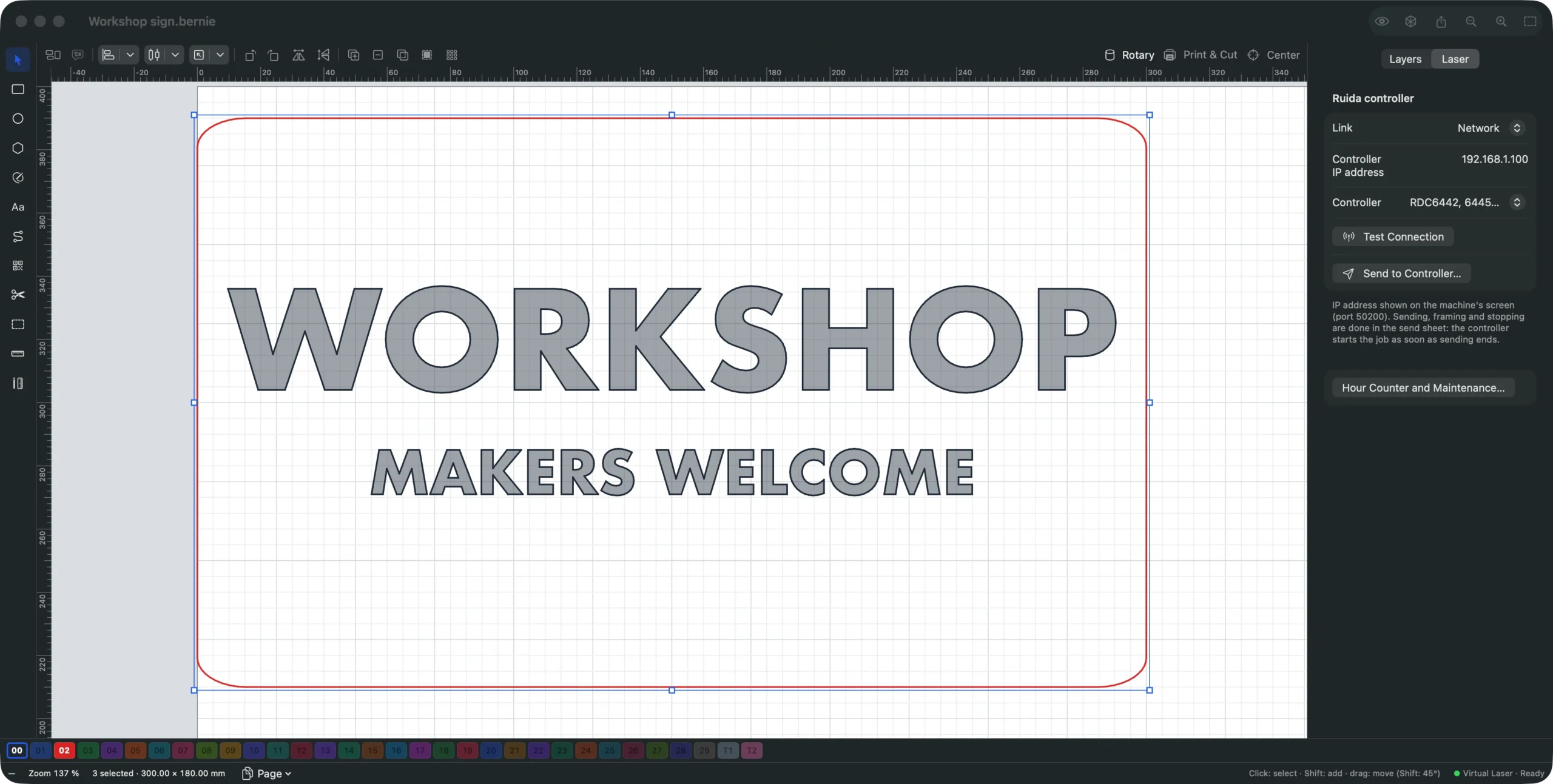
Here is the full setup on a Mac, the same in the Windows and Linux desktop app (where the sending command is under File › Export). The project is a 300 × 180 mm plywood sign, engraved text and a cut outline, for a CO2 laser with a Ruida controller.
- Connect the controller. Either plug an Ethernet cable from the machine into your router, then read the controller’s IP address on the machine’s screen; or plug a USB cable into the controller’s PC socket. Switch the machine on.
- Laser › Find My Laser… Bernie looks for Ruida controllers on your network (including the factory address, 192.168.1.100) and over USB, reads the board ID without moving or firing anything, and creates the device. If you set the machine up by hand, choose a CO2 laser and Ruida controller as the Controller at the Your machine step, then set the machine’s work area and origin.
- Check the link in the Laser panel. The panel of a Ruida device shows the Link (Network with the Controller IP address, or USB with the Controller USB port) and the Controller model: RDC6442, 6445, 6332, 654X… (most) or RDC634XG. Click Test Connection.
- Draw or import. Type the text, draw the outline, or use File › Import… for an SVG, a DXF, a LightBurn project or an
.rdfile from RDWorks. Put the engraving on a Fill layer and the outline on a Line layer. - Set speed and power per layer. Start from the material library or a Material Test… on an offcut. The minimum power is the controller’s corner power: on a glass tube, keep it above 0 %, the tube’s firing threshold.
- Check the preview. The eye button shows the real paths, the estimated time and the pre-flight check, which flags, for example, a layer speed beyond what your machine can do.
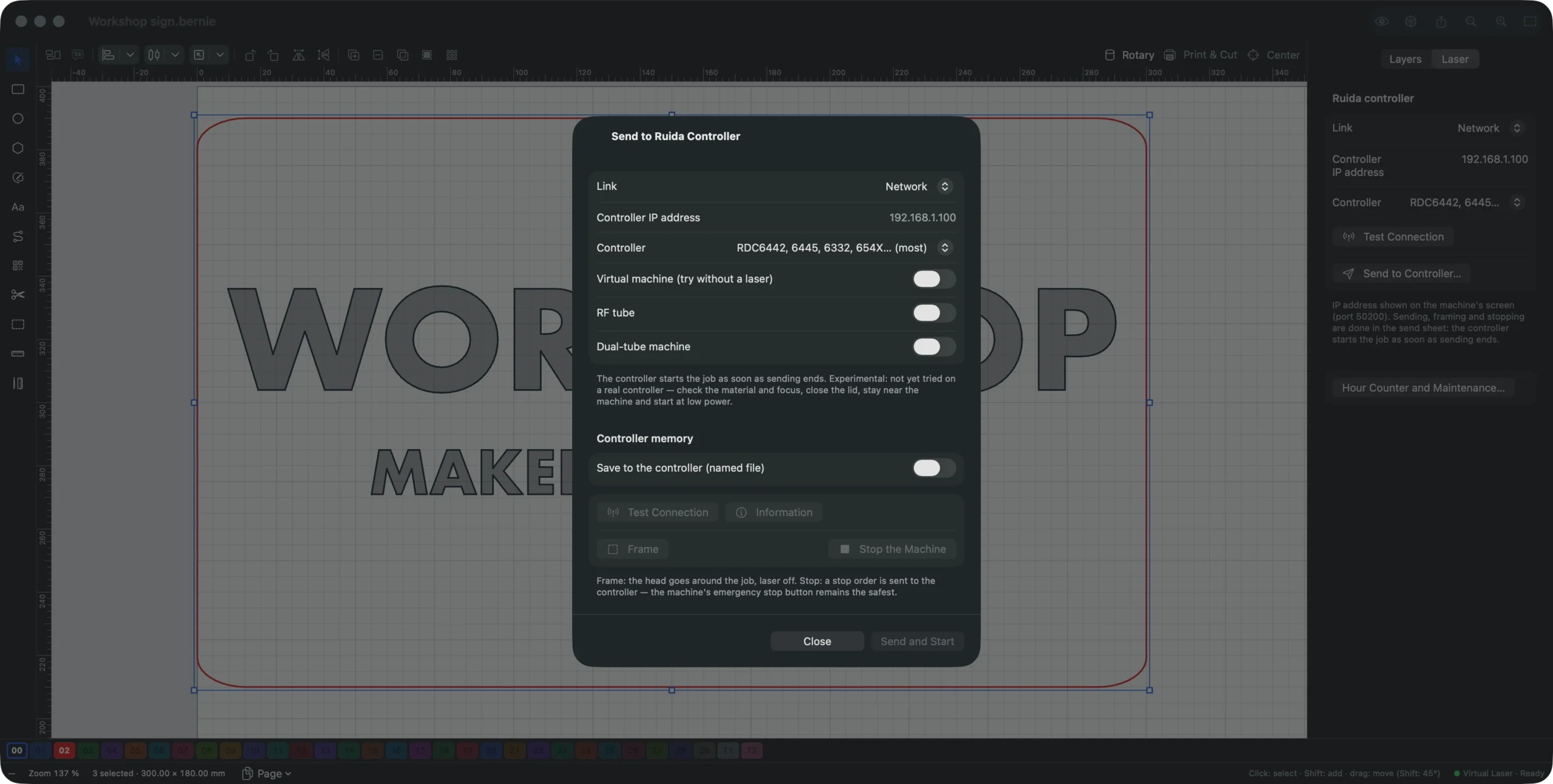
- Open the sending sheet. Click Send to Controller… in the Laser panel (or Laser › Send to Ruida Controller…). Tick RF tube if your tube is an RF one; otherwise the sheet flags a 0 % minimum power. To rehearse first, turn on Virtual machine (try without a laser): the job goes to an imaginary machine that tells you what it received.
- Frame, then send. Frame runs the head around the job, laser off, so you can place the sheet. Then Send and Start: the controller starts the job as soon as sending ends, so close the lid, wear your glasses and stay with the machine.
- Keep it for later, if you like. Save to the controller (named file) stores the job in the controller’s memory under a name, to start again from its screen; Number automatically moves the number on after each sending (Bernie-001, Bernie-002…).
No network cable within reach? File › Export for Ruida (.rd)… writes the same job to a file for a USB stick, each layer with its colour, speed and powers. The Files page of the manual details what goes into the .rd file, and the desktop app page covers Windows and Linux.
Drive your Ruida laser for free
Follow these steps with Bernie, free, with no account and no subscription, on Mac, Windows or Linux. Start with the virtual machine, then send your first job to the real controller.
Dual-tube Ruida machines
On a machine with two tubes, turn on Dual-tube machine in the sending sheet. Each layer then has a Tubes choice (both, tube 1 or tube 2 alone) and its own powers for tube 2: engrave with the small tube and cut with the big one, in a single job. You can name the tubes, allow Only one tube at a time, and set the measured offset of a second head so its layers line up with the first.
Common Ruida problems and what to check
| What you see | Likely cause | What to check |
|---|---|---|
| No answer on the network | Computer and controller on different networks, or wrong IP address | IP address on the machine’s screen; same network range (192.168.1.x, for example) |
| Nothing happens over USB | Stick socket used instead of the PC one, or missing driver | Cable in the PC socket; FTDI driver on older Windows |
| Corners weak or skipped on a glass tube | Minimum (corner) power at 0 % | Raise the minimum power to the tube’s threshold |
| Job lands in the wrong place | Origin or start position not what you expect | Frame before sending; check the origin set on the controller |
Bernie catches some of these before the job: the sending sheet flags a 0 % minimum on a glass tube, the pre-flight check looks at the job itself, and Information reads the controller’s card, version and counters without moving or firing anything. For speeds and powers per material, see our laser engraving settings chart.
Safety first, whatever the software
A CO2 laser can set wood and acrylic on fire within seconds. Keep the lid closed, run the extraction and air assist, keep a fire extinguisher nearby and never leave a job unattended. Never cut PVC or vinyl: they release chlorine compounds that harm you and corrode the machine. Use the machine’s emergency stop button rather than software when something goes wrong.
Conclusion
RDWorks stays useful for the controller itself, and LightBurn Pro is the mature paid choice. If you want an RDWorks alternative that is free, runs on your Mac, Windows or Linux computer and also drives your other lasers, download Bernie, rehearse with the virtual machine, then send your first job; see how it connects to each kind of laser.
Frequently asked questions
Is there an RDWorks version for Mac?
No. RDWorks runs on Windows only; on a Mac people use a Windows virtual machine. Bernie, LightBurn Pro, MeerK40t and Rayforge run on macOS and can send jobs to a Ruida controller.
What is the best free alternative to RDWorks?
It depends on what you need. For a free app that designs and sends to a Ruida controller on Mac, Windows and Linux, try Bernie. MeerK40t and Rayforge are free, open-source options. Keep RDWorks for vendor settings and firmware.
Does LightBurn work with Ruida controllers?
Yes, with LightBurn Pro ($199 one-time), which covers DSP and galvo controllers. LightBurn Core ($99) only covers G-code lasers. Updates are included for a year, then cost $40 a year.
RDWorks vs LightBurn: which is better?
RDWorks is free and controls everything the controller offers, but it is Windows only and dated. LightBurn is easier for design and runs on Mac too, but Ruida support needs the paid Pro licence. Free cross-platform options sit in between.
How do I connect a Ruida controller over Ethernet?
Plug an Ethernet cable from the machine into your router, read the controller’s IP address on its screen, and make sure the computer is on the same network range. Then enter that address in your software, or let Bernie’s Find My Laser search for it.
Can I open RDWorks .rd files in other software?
Bernie opens .rd files saved by RDWorks or LightBurn, as cut paths and layers with their speed and power. Curves, fills and images arrive as the segments and scan lines stored in the file.