Diode vs CO2 laser, fiber or galvo? For most beginners, a 10–20 W diode laser is the best first machine: affordable, compact and very good on wood, leather, slate and dark acrylic. Choose a CO2 laser to cut thicker wood or any acrylic, clear included, or to etch glass. Choose a fiber laser, almost always built as a galvo, if your work is marking metal.
The short answer
Wood, leather, slate and first steps: diode. Cutting, clear acrylic and glass: CO2. Bare metal and serial marking: fiber galvo.
A galvo is not a fourth kind of laser: it is a faster way of moving the beam, over a smaller field.
Diode vs CO2 laser vs fiber: how each one works
All three focus light into a spot hot enough to burn, melt or vaporize the surface. What changes is the wavelength, and it decides which materials absorb the beam and which let it through or reflect it.
Diode laser: blue light at about 450 nm
A diode laser is a semiconductor module, often several diodes combined, on a head that moves on rails. Its visible blue light (about 445–455 nm) is absorbed well by dark and organic materials: wood, leather, cardboard. Clear and blue materials let it pass straight through.
Modules range from 5 to 40 W of optical power. Check that figure, not the electrical input some listings advertise: a diode sold as “80 W” may deliver 10 W of light.
CO2 laser: infrared at 10.6 µm
A CO2 laser produces its beam in a gas-filled tube: a glass tube on most hobby and small-business machines, a metal RF tube on premium ones. Mirrors carry the beam to the head. Its far-infrared wavelength, 10,600 nm, is absorbed by almost every non-metal: wood, paper, leather, fabric, all acrylic, glass and stone.
That is why a 40–55 W CO2 cuts plywood and acrylic a few millimetres thick in one pass, where a diode needs several. Bare metal reflects it.
Fiber laser: near-infrared at about 1,064 nm
In a fiber laser, the light is generated and amplified inside an optical fiber, in a sealed, air-cooled source. Its 1,064 nm wavelength is invisible and well absorbed by metals (steel, stainless, brass, aluminium, titanium) and by many plastics. Q-switched sources are the standard; MOPA sources let you set pulse width and frequency, which gives colours on stainless steel and darker marks on anodized aluminium.
A fiber marking laser engraves metal deeply with repeated passes, but does not cut wood or acrylic. Cutting sheet metal is a job for industrial fiber machines of a kilowatt and more.
What is a galvo laser?
“Galvo” describes how the beam moves, not how it is produced. On a gantry laser, the head travels on rails along X and Y. On a galvo laser, the head stays still: two small mirrors on galvanometer motors swing the beam through a flat-field lens. With almost no mass to move, it marks at thousands of mm/s.
The trade-off is the field. A common 160 mm lens covers about 110 × 110 mm (4.3 × 4.3 in); larger lenses reach 300 × 300 mm, with a bigger spot and less power per mm². Most fiber marking lasers are galvos; CO2 and UV galvos exist too.
Which materials can each laser engrave or cut?
Typical hobby powers: 10–20 W diode, 40–60 W CO2, 20–30 W fiber. A galvo follows the column of its source. Always test on an offcut first.
| Material | Diode (450 nm) | CO2 (10.6 µm) | Fiber (1,064 nm) |
|---|---|---|---|
| Wood, plywood | Engraves; cuts thin sheets | Engraves and cuts thicker sheets | Light surface marks, not its job |
| Clear acrylic | No: the beam passes through | Yes: frosted engraving, clean polished cuts | No |
| Coloured acrylic | Dark opaque colours; cuts thin | Yes, every colour | Unreliable |
| Leather | Engraves; cuts thin leather | Engraves and cuts | Not its strength |
| Glass | Not directly (needs paint or a coating) | Frosted etching, bottles with a rotary | Not on clear glass (a UV laser does it) |
| Slate and stone | Yes, good contrast | Yes | Marks; results vary |
| Bare metal | Marking spray needed; faint heat tint on stainless | Marking spray only | Yes: marks, engraves deep, colours stainless (MOPA) |
| Anodized or painted metal | Yes: removes the coating | Yes: removes the coating | Yes |
| Plastics (ABS, POM…) | Dark plastics mark, many melt | Engraves and cuts many; test first | Marks many plastics, a common industrial use |
One rule applies to every laser: never engrave or cut PVC, vinyl or anything containing chlorine: the fumes are toxic and corrode the machine. If you can’t identify a plastic, don’t laser it.
Can a diode laser engrave metal?
Partly. A diode laser removes paint or the anodized layer from aluminium cleanly, with good contrast. On bare stainless steel, it needs a marking spray, or it leaves a slow, faint heat tint. It will not engrave deep or cut metal. Some machines add a low-power 1,064 nm infrared module next to the blue diode for this job; for regular metal work, a fiber laser remains the right tool.
Fiber laser vs CO2 vs diode: speed, work area and cutting
| Diode (gantry) | CO2 (gantry) | Fiber (galvo) | |
|---|---|---|---|
| Engraving speed (maker figures) | Roughly 100–600 mm/s | Roughly 300–1,000 mm/s | Several thousand mm/s |
| Work area | About 400 × 400 mm (16 × 16 in) on open frames | From 300 × 200 mm (K40 type) to over 1,000 mm on cabinet machines | 110 × 110 mm standard, up to about 300 × 300 mm |
| Cutting | Thin stock; thicker in several passes | Wood and acrylic in one pass; thickness grows with power | Not designed for it; thin metal sheet with many passes |
Maintenance, safety and space: the hidden costs
Maintenance
- Diode: clean the lens, check belts and wheels. No alignment, no cooling water.
- CO2: clean the mirrors and lens, realign the mirrors after a knock, watch the cooling water. Glass tubes are consumables, rated by vendors from about 1,500 to 10,000 hours; RF tubes last longer but cost much more.
- Fiber: close to maintenance-free. Sources are commonly rated around 100,000 hours by their makers; keep the lens clean.
Safety: laser class, enclosure and goggles
Open-frame diode lasers and bare galvo markers are Class 4 products: the beam and its reflections can injure your eyes instantly and start fires. A fully enclosed machine with interlocks and a filtering window can be certified Class 1. Check the label rather than the marketing.
Goggles must be rated, with an optical density (OD), for your exact wavelength: glasses made for a blue diode are not necessarily rated for 1,064 nm, so check the OD printed on the lens. The fiber beam is invisible, which makes it the most treacherous for the eyes. Whatever the laser, never leave it unattended and keep a fire extinguisher within reach.
Space, cooling and fume extraction
An open diode frame fits on a desk but needs an enclosure or good ventilation. A desktop CO2 is 0.7 to 1 m (28–40 in) wide, needs water cooling for its glass tube, often a separate chiller, and a duct to a window; a 100 W cabinet needs its own floor space. A fiber galvo has a small footprint, but still needs a shield and extraction.
Every laser makes smoke and fine particles: vent outside or use a filtering extractor.
How much does a laser engraver cost in 2026?
Rough street prices in US dollars in 2026, machine only. They vary with promotions, bundles and regions: use them to size a budget, not as quotes.
| Category | Typical price in 2026 | Budget extra for |
|---|---|---|
| Entry-level diode, 5–10 W, open frame | About $200–600 | Enclosure or extraction, goggles |
| Diode 20 W and up | About $500–1,500, more with enclosure and camera | Extraction, air assist if not included |
| Desktop CO2, 40–55 W | About $550–800 for a basic K40 type; $2,000–5,000 enclosed, with camera | Chiller, ducting, spare tube |
| Larger CO2, 60–100 W+ | About $3,000–8,000 and up | Floor space, chiller, ducting |
| Fiber galvo, 20–60 W | About $1,500–3,500 for basic markers; $3,000–7,000 for MOPA or enclosed | Shield or enclosure, 1,064 nm goggles, rotary |
Which laser engraver should I buy? Recommendations by profile
The best laser engraver for beginners
A 10–20 W diode with air assist, enclosed if it lives indoors. It engraves wood, leather, slate and dark acrylic, cuts thin plywood, and teaches you focus, speed and power without a chiller. Prefer a machine running GRBL, for the widest choice of software. Our laser settings by material guide gives you starting values.
A small business: gifts, signs, acrylic
A 40–55 W desktop CO2, ideally with a camera. It cuts faster than a diode, handles all acrylic and glass, and earns its keep on volume. For mostly wooden products, a 20 W+ diode is a cheaper start.
Metal: tags, tumblers, tools, jewellery
A 20–30 W fiber galvo. Choose MOPA for colours on stainless steel or deep black on anodized aluminium, and plan a rotary for tumblers and rings. A diode with marking spray is fine for occasional tags, not for a metal business.
Cutting: thick wood, clear acrylic, production
A 60–100 W CO2, usually with a Ruida controller and a larger bed. Check the floor space, the ventilation and the power supply before you order.
Questions to ask before you buy
Before you order
- What will I make most of the time, and from which materials?
- Do I need to cut, and how thick, or only engrave?
- Clear acrylic or glass on the list? Then CO2. Bare metal? Then fiber.
- Is the power stated as optical output, not electrical input?
- Where will it live: room for an enclosure, a duct to the outside, a chiller?
- Laser class, enclosure and goggles rated for the right wavelength?
- Which controller is inside (GRBL, Ruida, JCZ galvo, proprietary), and which software can drive it?
The controller matters more than the brand. GRBL boards, common on diode lasers, work with many programs; Ruida is usual on larger CO2 machines; galvo markers often ship with a JCZ board and EZCad. Ask the seller which board is inside.
Try before you buy: how Bernie works with each type of laser
Bernie is free laser software, funded by donations, with no account or subscription. It covers the four families above, but not every controller in the same way, as its compatible machines page shows:
| Controller | Connection | Support in Bernie |
|---|---|---|
| GRBL (grblHAL, FluidNC, GRBL-M3) | USB, Wi-Fi, Ethernet | Direct control |
| Marlin, Smoothieware | USB | Direct control |
| Custom G-code (Duet, Mach3/4, UCCNC) | Depends on the machine | Direct control |
| Ruida, including dual tube | Network, .rd file, Bernie Link relay | Being validated |
| JCZ galvo (EZCad2, EZCad3 configuration) | .ezd export | EZCad export |
| Trocen, TopWisdom, K40 (M2 Nano), xTool and Emblaser own protocols | — | File preparation |
Learn on the virtual laser first
The virtual laser simulates a complete GRBL machine, accelerations included: learn, prepare files and estimate job times with no hardware. A virtual galvo, Ruida and JCZ board are included too.
- Open Bernie Studio in your browser, or install Bernie from the download page (Windows, Linux and the browser today; Mac, iPad and iPhone soon).
- At first launch, choose your type of laser (diode, CO2, fiber) or the virtual laser.
- Apply a setting from the material libraries: more than 1,800 settings, for diode, CO2 and MOPA fiber.
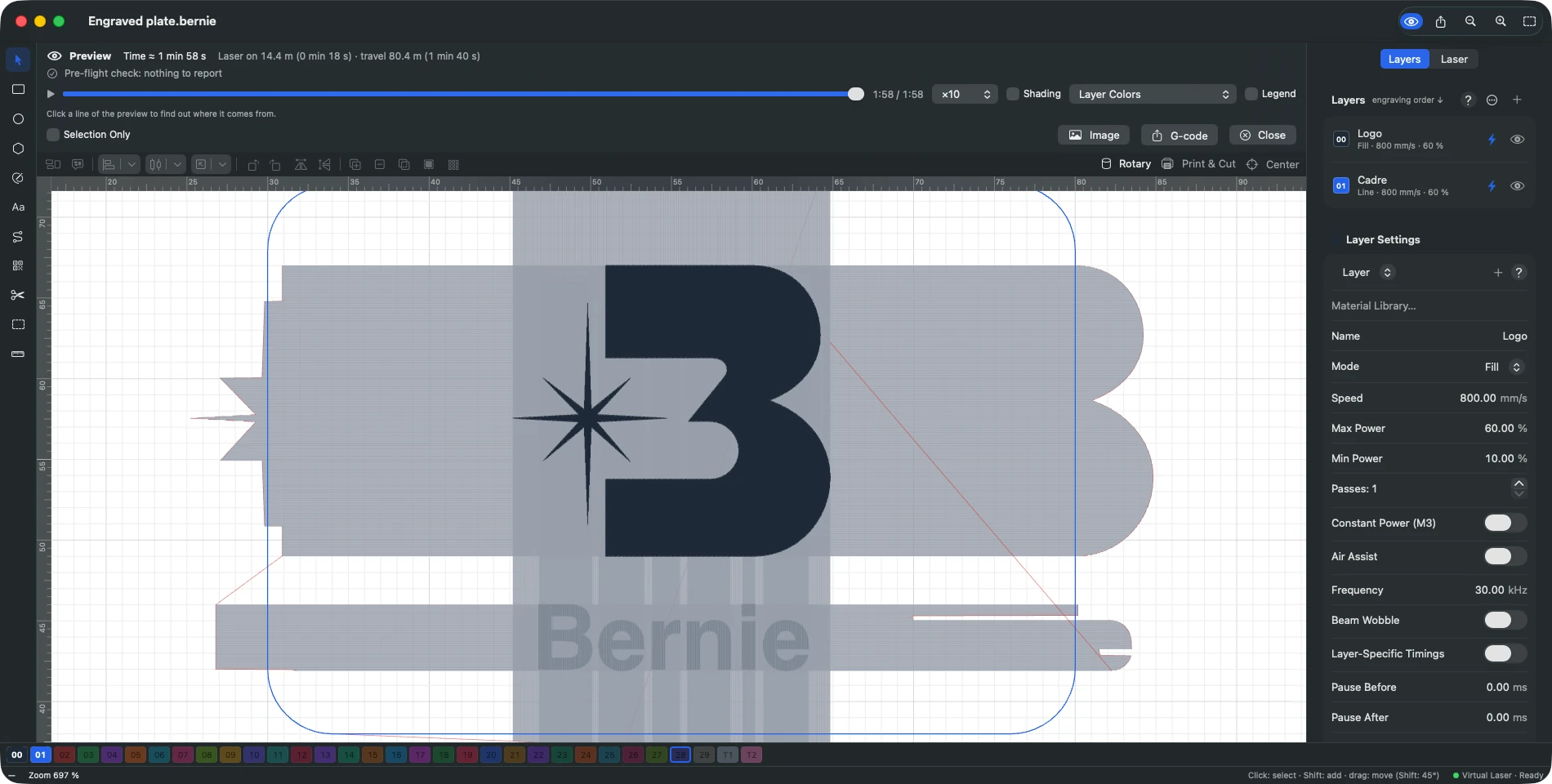
- Open the preview: it replays the job line by line, estimates the time and answers “Why this line?” when you click a path.
Find My Laser: from unboxing to first job
When the machine arrives, plug it in over USB. “Find My Laser” tries the usual port speeds and creates a profile from the machine: work area, power, speeds, accelerations. If it fails, it says why: port busy, not found or missing driver.
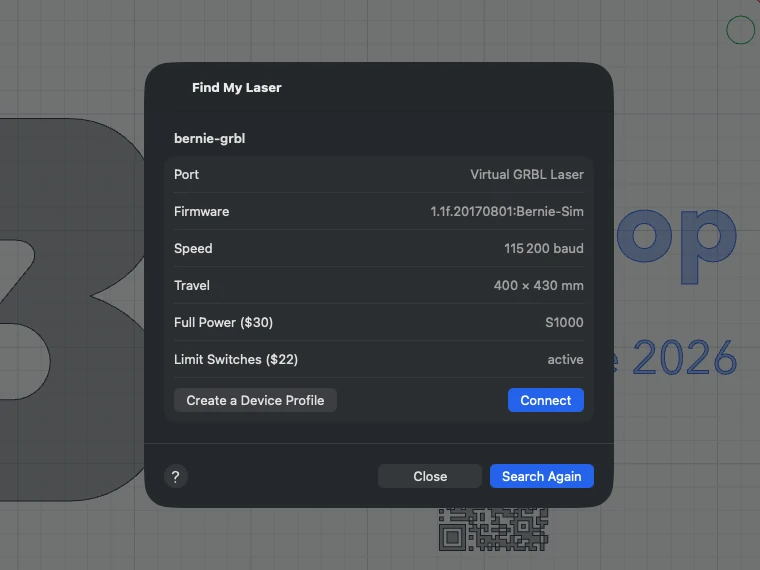
The catalog also lists 17 machines ready to go, from xTool, Snapmaker, Emblaser, Ortur, Sculpfun, Creality, Atomstack and WorldStarTech, and your LightBurn .lbdev device profiles can be imported. More on connection and control, and in our free LightBurn alternative guide.
No camera on the machine you want? Bernie can use a USB or network camera, or a photo taken with your phone: see camera and rotary.
Galvo and fiber: prepare in Bernie, mark with EZCad
For JCZ galvo machines, Bernie prepares, simulates and exports your markings: lens field, fiber, MOPA, UV or CO2 sources, lens corrections, cylinder correction and galvo rotary. Projects are exported as .ezd files, checked in EZCad 2.14.11, and you run the job from EZCad. Details on the galvo and fiber page.
Try Bernie before you buy a laser
Free, no account, no subscription, with a virtual laser to learn on while you choose.
Frequently asked questions
Is a diode or CO2 laser better for beginners?
A diode laser is usually the better first machine: cheaper, smaller, with no water cooling or mirror alignment, and very good on wood, leather and slate. A CO2 laser is the better choice if you will cut a lot, work with clear acrylic or etch glass.
Is a diode laser good for metal?
Only for marking. It marks anodized or painted metal by removing the coating, and bare stainless steel with a marking spray, but cannot engrave metal deeply or cut it. For regular metal work, a fiber laser is the right tool.
Fiber laser vs CO2: which is better for metal?
Fiber. Bare metal absorbs the 1,064 nm wavelength of a fiber laser, while it reflects the 10.6 µm beam of a CO2, which can only mark metal through a marking spray. In return, a CO2 cuts wood and acrylic, which a fiber laser is not designed to do.
Is a galvo laser better than a gantry laser?
It is much faster, often thousands of mm/s, because only two small mirrors move. But its field is small, typically 110 × 110 mm, and it is built for marking rather than cutting. A gantry suits large pieces; a galvo suits small parts in series.
What software will work with my laser?
It depends on the controller inside, more than on the brand. GRBL-based diode lasers work with many programs; Ruida CO2 and JCZ galvo machines need software that supports them explicitly. Check the controller in the documentation or on the board’s label.